Video pipeline: promos drawn in code
A video pipeline I built with Claude Code that draws every frame of my promo and YouTube videos in Python and Blender, with an ElevenLabs voice, and renders a four-minute video in about a minute on my PC.
- Status
- Done · 2026
- Built with
- Python 3.12, skia-python, NumPy, OpenCV, ffmpeg, Blender 5.2, ElevenLabs, Claude Code
- Time
- Since November 2026
- People

I make promo and explainer videos without a camera, an editing app or a motion designer. Every frame is drawn in code that Claude Code writes, and I direct it with notes in plain words. This is the engine behind that: a folder of Python scenes that draws my brand's lattice and P frame by frame, Blender for real 3D, ElevenLabs for the voice and the music, and ffmpeg to put it all together.
If you want to make videos this way yourself, start with the workflow in my AI toolbox: the steps and every prompt, built on HyperFrames, which anyone can install. This page is the custom part underneath, the renderer I built for my own brand, and what it took to make it fast.
Why I built it
My brand is geometry: a 60° triangle lattice and a P built from its cells. An editing app treats that as a picture to move around. I wanted it to behave like the site does, where the lattice grows, lights up and rearranges, and that is easier to write than to keyframe.
I also wanted every change to be a sentence. "The logo comes in too late" should mean one number changes and the video renders again, not an evening in a timeline. And I wanted to try ideas on my own machine, without paying a video model for every attempt.
How it works
One folder holds everything, and every step saves its own files: the script, one voice file per sentence, the music, the scenes, the renders. When a sentence sounds wrong, that sentence is recorded again and nothing else changes.
- script.json holds the voice lines and the shortest each scene may be.
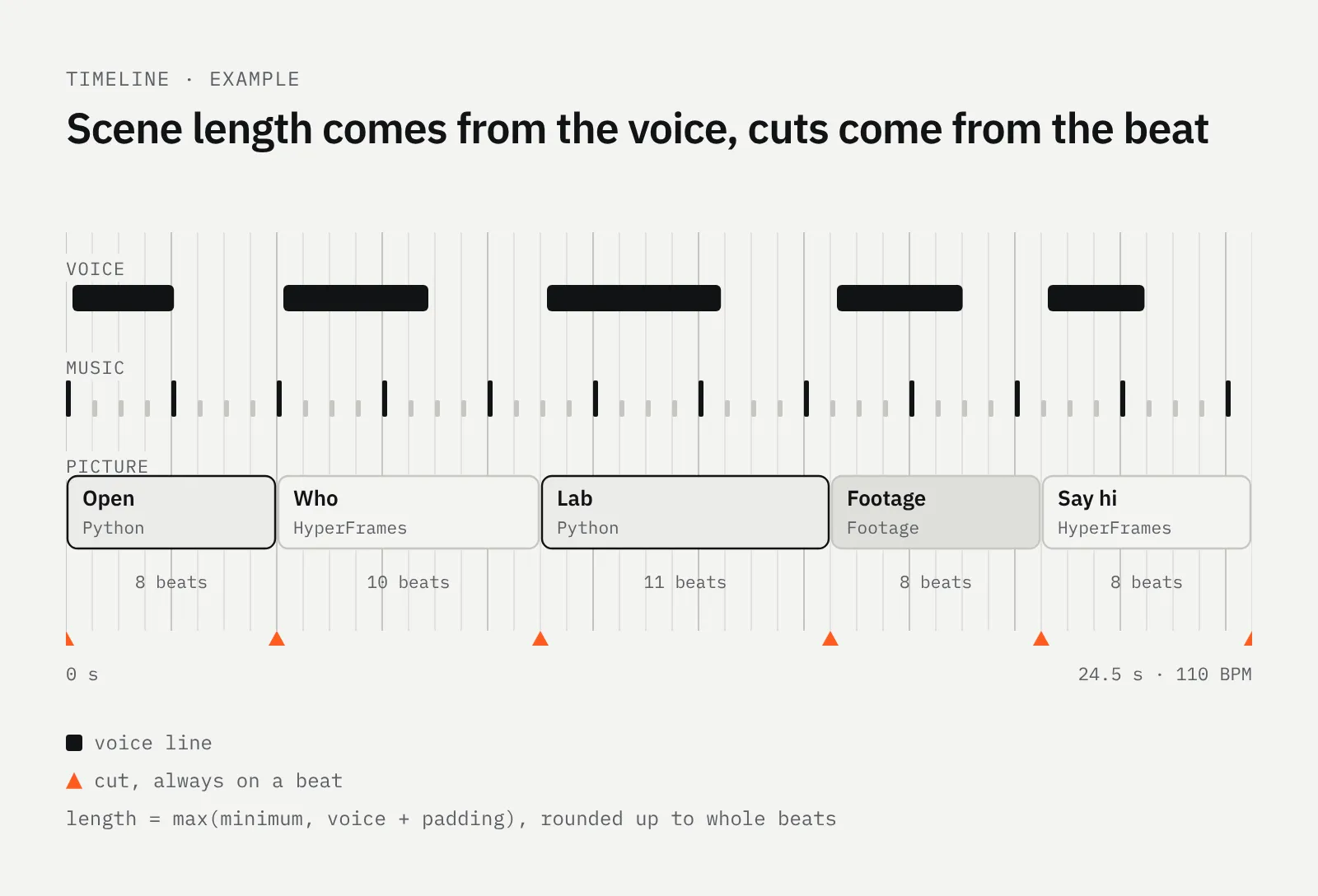
- timeline.py makes each scene as long as its voice line plus padding, then rounds it up to whole beats of the music. Every cut lands on a beat because the timeline is built from the beat grid.
- core.py holds the brand: colours, IBM Plex, easing curves, and the lattice and P with the same geometry as the site's own code.
- Scene files are Python functions of time. Skia draws each frame and adds the bloom, NumPy and OpenCV grade the footage, and raw frames go straight into ffmpeg.
- mix.py places each voice line at its cue, ducks the music under it, measures the loudness and applies one gain to -14 LUFS, where YouTube plays it.
It isn't one script. Each film got its own scene file on top of the shared core, and the code grew with every video.
Lines of Python per file
- YouTube tutorial (tut.py)1,223
- Tutorial, guide cut (guide.py)982
- First Lab promo (render.py)685
- Drawn animation (anim.py)607
- 30-second cut (v2.py)436
- Cinematic promo (cine.py)423
- Brand core (core.py)377
Footage, voice and music
Stock clips come from Pixabay. The agent searches, shows me a numbered contact sheet, and I pick by number. Each clip is then graded to the brand, with the lattice cut in as windows, wipes and overlays. A credits file keeps the source of every clip.
The voice is ElevenLabs, the voice Eric, fetched lossless at 48 kHz, one file per sentence. After that a light chain: EQ, gentle compression, a short room and a limiter. The score is ElevenLabs Music, asked for the mood, the exact length and a hit on the cut points, with the prompt saved next to the file so it can be made again.
Real 3D from Blender
When a shot needs real depth, the agent builds it in Blender. I don't open Blender: a portable Blender 5.2.3 sits in the project, the agent writes the scene as Python, and Cycles renders it on the graphics card with OptiX. The Earth, Moon and satellite models come from NASA. Each shot comes out as an image sequence that the Python renderer composites with the HUD, the voice and the music.
Making it fast
The renderer started on my Mac, where the four-minute YouTube video took about 15 minutes. Then it moved to my Windows desktop for the heavy work: an Intel Core Ultra 9 285K with 24 cores, 64 GB of RAM and an RTX 4070 SUPER. The first render there showed 7% CPU in Task Manager, and the estimate for the same video was almost three hours.
Two things were wrong. The renderer was one Python process, so it kept one core busy out of 24. And every frame took 1.3 seconds, almost all of it Skia compositing on the CPU: the bloom, the vignette and the film grain, about 20 full-frame passes per frame. The Windows build of Skia does this far slower than the Mac one.
Rendering the 4:15 YouTube video at 1080p
- CPU, one process2 h 46 min
- CPU, 22 processesabout 15 min
- GPU, one process1 min 32 s
- GPU, 12 processes43 s
Fix 1: every core at once
A parallel renderer splits the timeline into chunks on whole frames, renders each chunk in its own process and joins them with ffmpeg without encoding again. I checked it frame by frame against a single-process render: the same frame count, no gaps or doubles at the seams. That alone was about 11 times faster.
Fix 2: drawing on the GPU
An invisible window gives Skia an OpenGL context, so it draws on the graphics card instead of in memory. The drawing code didn't change at all, only the 12 places that create a drawing surface. A frame went from 1,300 ms to about 5 ms.
Drawing one 1080p frame
- Skia on the CPU1,300 ms
- Skia on the GPU5 ms
Now the whole build, with the render, the voice effects and the mix, takes about a minute. A 4K render takes about three and a half minutes. Final encodes run on the card's NVENC encoder, and a live progress bar in the terminal shows every chunk. The full measurements and the code changes are in the toolbox entry.
Notes, one sentence at a time
I watch a render and write what bugs me, one sentence per note. Previews are 720p and only the scene that changed renders again. My first brand promo went through six versions this way.
What broke
- Glitchy transitions. The triangle wipe broke the old scene into hard-edged triangles that popped off in about 13 frames, so bits of text flickered. The new one has soft edges, a crossfade underneath and runs 0.7 s instead of 0.45 s.
- A smeared voice. Pitch-shifting the voice to make it deeper smeared it. Now it is EQ and compression only.
- Pumping loudness. A single-pass normaliser kept riding the level. Measuring first and applying one gain fixed it.
- Dying encoders. 16 processes at 4K made some encoders die, most likely out of memory. The default is 12, and past 8 jobs the chunks encode on the CPU, because a GeForce card allows 8 NVENC sessions at once.
- Different text. Windows and macOS draw glyph edges slightly differently, so a PC render and a Mac render of the same frame differ at about 40 dB. Only the text antialiasing, not the effects.
Use it yourself
The renderer is tied to my brand, so I don't hand it out as one file. What you can take is the method: the workflow and its prompts in my AI toolbox, built on HyperFrames, an open-source framework from HeyGen, installed as a Claude Code plugin, that turns HTML scenes into MP4. Start there, and write a Python scene only when HTML gets slow.
The scripts for my YouTube videos come from my own writing skills; the Shorts version is in the toolbox too.
Who built it
- Vedran PetračDirection, code, videoI build apps and websites, and the odd maths model.About me

Follow along
New builds and write-ups now, videos from 2027. Pick the channel you already use.
- GitHubCode and files from the Lab
- YouTubeLab builds on videoComing in 2027
- Say hi[email protected]