YouTube Shorts script
A skill that writes a YouTube Short from a topic or a long script: three hooks, timed beats with on-screen text, and an ending that loops.
- Type
- Skill · v1.0
- Works with
- Claude Code, Claude.ai
- Updated
- 8 Nov 2026
- Licence
- MIT, use it anywhere
- People
- SKILL.md
- references/
- hooks.md
- template.md
- voice.md
unzip youtube-shorts.zip -d ~/.claude/skills/Write a 45-second Short from section 3 of this scriptHow it runs
- One ideaWhat they know after 40 s
- Three hooksDifferent types, pick one
- BeatsHook, problem, payoff, loop
- BudgetAbout 2.5 words a second
- TitleUnder 40 characters
A skill that turns a topic, a brain dump or one section of a long script into a YouTube Short: three hooks, the beats with timing and on-screen text, an ending that loops, and a title.
Why I built it
My long-form scripts go through a chain of skills: outline, intro, body sections, hooks, a QC pass for each part, CTAs, chapter titles and 30 title options. That's right for a ten-minute video and far too much for 40 seconds. This is the same thinking in one skill, cut down to what a Short needs: a hook that stops the swipe, one idea, a payoff and an end that loops.
How it works
- One idea. One sentence on what the viewer knows after 40 seconds. Two ideas means two Shorts.
- Three hooks, each a different type: result first, mistake call-out, contrarian, mid-scene, hidden cost, before and after, or a question. The hook is the first spoken line and the first on-screen text, so it has to work with the sound off.
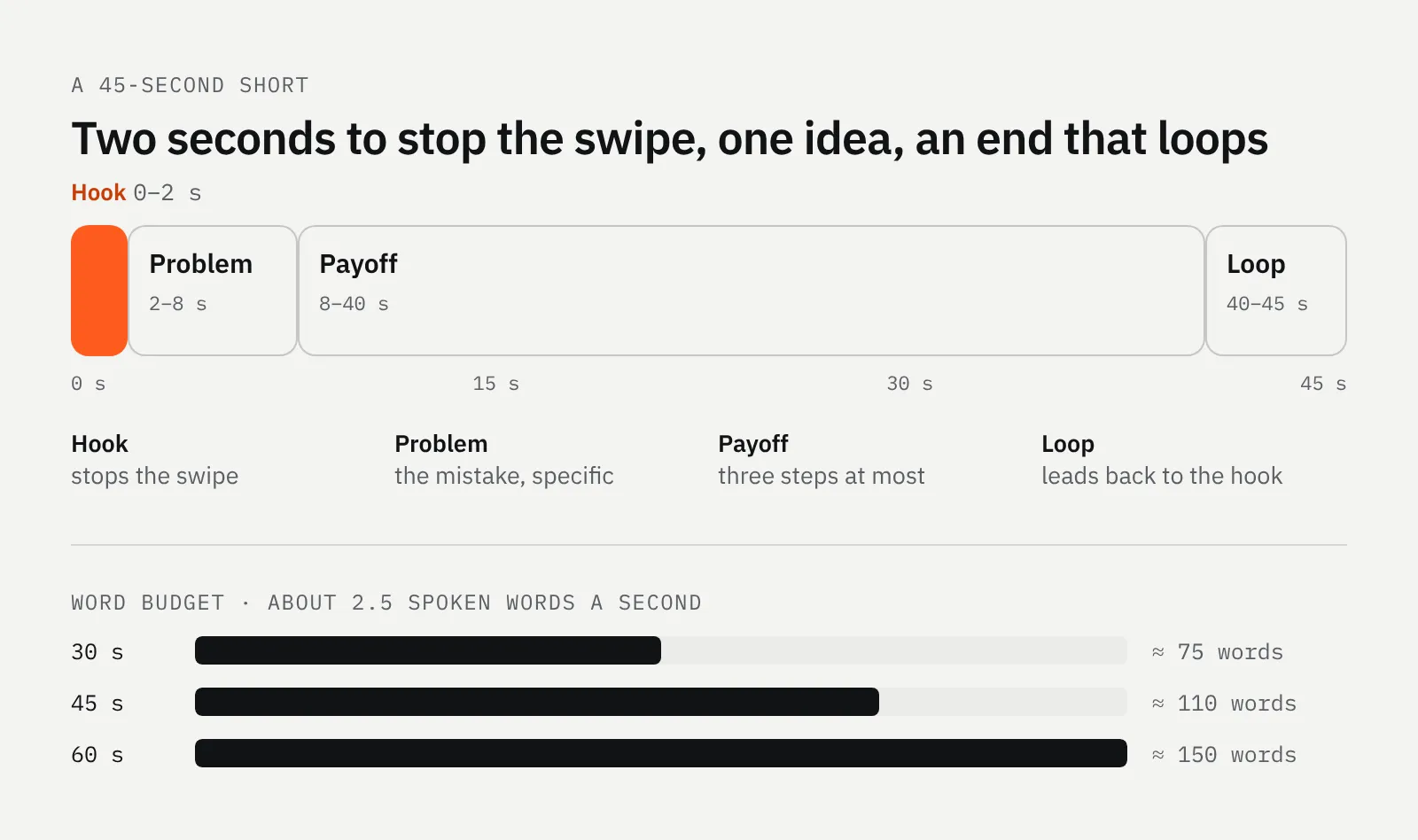
- The beats: hook, problem, payoff, loop, each with its time, the voice line, five words of on-screen text and a note on what's on screen.
- The word budget. Spoken English runs about 2.5 words a second. Over budget, the problem beat gets cut first, never the payoff.
- Title and description. A title under 40 characters, one or two sentences and the link to the long video.
What changed from the long-form skills
| Long video | Short |
| --- | --- |
| Intro: hook, invalidate, roadmap | The hook only |
| 7 to 10 points, each with its own hook | One idea, three payoff steps at most |
| Midroll and endscreen CTAs | A last line that loops, or one next step |
| 30+ titles from outlier research | One title under 40 characters |
| A separate QC skill for each part | One checklist at the end |
The voice rules stayed: first person, plain verbs, no hype words, no em dashes, no "in this video". If you have your own voice file, the skill reads that instead of its own.
How to use it
- Install it: unzip it into your skills folder (the command above).
- Give it the material: a topic, a brain dump, or a section of a finished long script. Each section of my long scripts is written to stand alone, so one section is usually one Short.
- Say the length and the link, for example "45 seconds, link to the full video".
- Pick a hook or ask for three more, then read it out loud with a timer.
What's inside
---
name: youtube-shorts
description: Write a YouTube Short script (15 to 60 seconds) from a topic, a brain dump or a section of a long video. Gives three hooks, picks one, then writes the beats with timing, on-screen text and a looping last line, plus the title and description. Use when asked for a Short, a vertical video script, or to cut a long script down to a Short.
---

# YouTube Shorts script

One skill, one pass. It replaces the long-form chain (outline, intro, body, hooks, QC, CTAs, chapters) with the four things a Short needs: a hook that stops the swipe, one idea, a payoff, and an end that loops.

## Input

One of:
- a topic or brain dump
- a finished long-form script, or one section of it (each section of a long script is written to stand alone, so it is usually one Short)
- a clip or transcript to write a voiceover for

Also ask for, if missing: who it is for, and the long video or page it should send people to (for the related-video link). Never invent a story, a number or a result. If the brain dump has none, ask for one.

## Write it

1. **Find the one idea.** One sentence: what the viewer knows or can do after 40 seconds. If there are two ideas, that is two Shorts. Say which one you picked.
2. **Write three hooks,** each from a different type in `references/hooks.md`. The hook is the first spoken line *and* the first on-screen text. It has to work with the sound off. Pick the best one and say why in one line.
3. **Write the beats** with `references/template.md`:
   - **Hook** (0 to 2 s): the picked hook. No greeting, no name, no "in this video".
   - **Problem** (2 to 8 s): the situation or mistake, specific enough to feel real. Let it land before the fix.
   - **Payoff** (8 to 40 s): the method, the story or the result. Three steps at most. One real number if the brain dump has one.
   - **Loop** (last 2 to 4 s): a line that leads back into the hook, so the replay feels like a continuation. Or a single next step ("The full version is linked above").
4. **Budget the words.** Spoken English runs about 2.5 words a second. 30 s is about 75 words, 45 s about 110, 60 s about 150. Over budget? Cut the problem beat first, never the payoff.
5. **Add on-screen text** for each beat, five words at most, and a one-line visual note (what is on screen).
6. **Title and description.** Title under 40 characters, the hook's promise in plain words, no clickbait the video doesn't pay off. Description: one or two sentences and the link. No hashtag walls; two or three relevant ones at most.

## Check before you return it

- [ ] The hook works cold, with the sound off, in the first two seconds
- [ ] The hook doesn't give away the payoff
- [ ] One idea only, and the payoff delivers what the hook promised
- [ ] Inside the word budget for the target length
- [ ] The last line loops into the first, or gives one clear next step
- [ ] No subscribe or like ask before the payoff, no "hey guys", no "make sure to"
- [ ] Every number, story and result comes from the input
- [ ] Reads like someone talking, passes `references/voice.md`

## Output

```
ONE IDEA: <sentence>

HOOKS
1. <type> · <hook>
2. <type> · <hook>
3. <type> · <hook>
Pick: <n>, because <one line>

SCRIPT · <target> s · <word count> words
(the filled template)

TITLE: <under 40 characters>
DESCRIPTION: <one or two sentences + link>
RELATED VIDEO: <the long video or page to link>
```
Changelog
- v1.0Shorts version of my long-form YouTube writing skills: one skill, three hooks, timed beats and a looping end.
Who made it
- Vedran PetračAuthorI build apps and websites, and the odd maths model.About me
Follow along
New builds and write-ups now, videos from 2027. Pick the channel you already use.
- GitHubCode and files from the Lab
- YouTubeLab builds on videoComing in 2027
- Say hi[email protected]